Coffee Cup Mockup V2: A Practical Tool for Designers, Marketers, and Small Business Owners
Whether you're launching a new artisanal coffee brand, refreshing your café’s packaging, or preparing social media visuals for a seasonal beverage campaign, presenting your design in context makes all the difference. That’s where Coffee Cup Mockup V2 comes in—not as just another digital asset, but as a purpose-built solution to bridge the gap between concept and credibility.
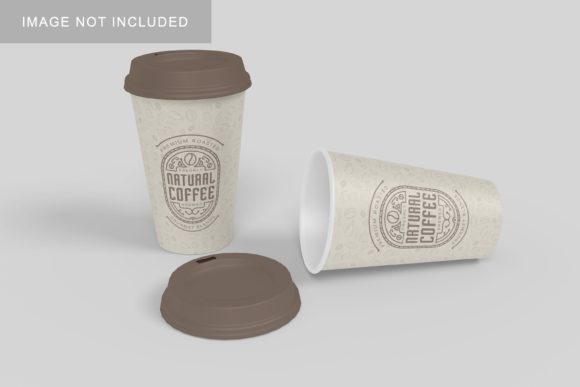
Coffee Cup Mockup V2 is a high-fidelity, layered PSD (and often compatible with Figma or Sketch) template that lets you insert your custom artwork—logos, labels, typography, or full-wrap designs—onto a photorealistic coffee cup. Unlike static images or basic templates, this version emphasizes flexibility: adjustable shadows, realistic lighting angles, multiple cup orientations (front, angled, top-down), and customizable backgrounds. It’s designed not to dazzle with complexity, but to save time while delivering professional results—every time.
Why Realistic Presentation Matters More Than You Think
When stakeholders review a new cup design—be it a roaster’s wholesale partner, a café owner evaluating merch, or a marketing manager approving Instagram assets—they don’t see raw vector files. They see how it looks *in the real world*: held in hand, sitting on a counter, or styled beside a notebook and laptop. Without that context, even brilliant design can feel flat or unconvincing.
This is especially true when working remotely or across teams. A designer may spend hours perfecting label spacing and color contrast—only to have a client reply, “It doesn’t pop like I imagined.” That disconnect rarely stems from poor design; it’s usually due to missing environmental cues. Coffee Cup Mockup V2 solves this by grounding your work in realism—giving viewers immediate spatial and emotional reference points.
Who Benefits—and How They Use It Differently
The value of Coffee Cup Mockup V2 shifts meaningfully depending on your role—and that’s by design.
- Graphic designers use it to present label concepts efficiently—swapping artwork across multiple cup variants in minutes instead of hours. Layered smart objects mean no manual warping or perspective correction.
- Small business owners and café operators rely on it to preview limited-edition cup designs before committing to print runs. Seeing how a matte black finish looks against warm wood tones—or how gold foil reflects under natural light—helps avoid costly reprints.
- Digital marketers leverage Coffee Cup Mockup V2 to build cohesive visual campaigns: pairing a single cup mockup with consistent background textures, lighting, and styling across Instagram carousels, email headers, and landing pages. Consistency builds trust—and consistency starts with reliable, repeatable assets.
- E-commerce teams integrate it into product launch workflows—using the same mockup file to generate hero banners, thumbnail previews, and lifestyle shots. One source file, multiple high-impact outputs.
Practical Applications That Deliver Real Outcomes
It’s not about having more tools—it’s about having the right tool at the right moment. Here’s how Coffee Cup Mockup V2 translates into tangible wins:
Speed up client approvals. Instead of sending flat PDFs and waiting 3–5 days for feedback, drop your logo into Coffee Cup Mockup V2, export a crisp PNG, and share a visual that answers the unspoken question: “Will this look good *on the shelf*?” Clients respond faster—and with clearer direction—when they can visualize the outcome.
Reduce production risk. Before ordering 500 custom-printed tumblers, test three label variations using the mockup. Rotate lighting, try different cup colors (white ceramic, kraft paper, matte black), and observe contrast and legibility at thumbnail size. What looks elegant at 100% zoom may vanish on mobile—Coffee Cup Mockup V2 helps catch those issues early.
Strengthen brand storytelling. A well-styled mockup isn’t just about the cup—it’s about the mood. Pair Coffee Cup Mockup V2 with subtle background textures (marble, linen, weathered wood) and intentional props (a spoon, steam curl, handwritten note) to evoke warmth, craftsmanship, or modern minimalism—without adding a single word.
What to Look For—and What to Skip
Not all mockups are built for real-world use. When evaluating or selecting Coffee Cup Mockup V2 (or any iteration), prioritize these practical traits:
- Smart object support: Ensures your design scales and aligns without distortion—no manual layer masking required.
- Multiple lighting presets: Soft daylight, studio flash, or warm ambient—each changes how colors and textures read. Having options means better alignment with your brand’s visual language.
- Background flexibility: Transparent PNG exports let you composite into any scene. Some versions include editable background layers—ideal for quick A/B testing of environments.
- Realistic material rendering: Look for subtle gloss on ceramic, texture on paper sleeves, or slight translucency in glass mugs. These details signal authenticity to discerning viewers.
Avoid overcomplicated files with dozens of unused layers or rigid dimensions that don’t match common print specs (e.g., 16 oz ceramic mugs at 4.5" × 6"). Simplicity, clarity, and adaptability are the hallmarks of a truly useful Coffee Cup Mockup V2.
Getting Started—Without Overthinking It
You don’t need advanced Photoshop skills to benefit from Coffee Cup Mockup V2. Start small: open the file, locate the smart object layer labeled “Your Design Here,” double-click to edit, paste your label or logo, save, and close. The mockup updates automatically. In under two minutes, you’ve gone from flat artwork to a compelling, context-rich image.
For best results, keep your source file clean—high-resolution (300 DPI), RGB mode, and transparent background if possible. And remember: the goal isn’t pixel-perfect realism at all costs. It’s clarity, confidence, and connection—with your team, your clients, and your audience.
Ultimately, Coffee Cup Mockup V2 succeeds because it respects your time and honors your intent. It doesn’t ask you to learn new software or master 3D rendering. It asks only that you bring your idea—and then gives you a credible, polished way to show it, share it, and move forward with conviction.