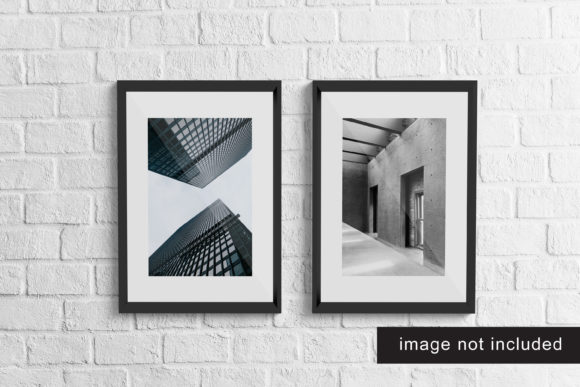
Realistic Frame Mockup V4: A Practical Asset for Presenting Visual Work
Realistic Frame Mockup V4 is a layered PSD and smart-object-enabled mockup designed to display digital artwork, photography, branding assets, or printed materials as if they’re mounted in a physical frame. Unlike basic templates with flat shadows or generic bevels, this version emphasizes material fidelity—wood grain texture, subtle lighting gradients, natural shadow fall-off, and perspective-correct canvas depth. It’s not a standalone design tool but a presentation layer: a bridge between creation and client-ready delivery.
What Sets Realistic Frame Mockup V4 Apart
The “V4” designation reflects iterative improvements—not just visual polish, but workflow refinements grounded in actual usage. Earlier versions relied on manual layer adjustments for sizing or lighting; V4 uses nested smart objects that preserve aspect ratios and scale non-destructively. The frame itself includes three interchangeable variants: a light oak finish with visible grain, a matte black metal profile, and a minimalist white-washed wood—each with matching shadow behavior calibrated for consistent realism across lighting conditions.
One practical strength lies in its ambient occlusion handling. When you insert artwork, the mockup automatically adjusts edge softness and corner shadow intensity based on the image’s brightness and contrast values—no manual blending required. This isn’t AI-driven automation, but a well-structured layer mask system built into the PSD file. It responds predictably, not magically, which means users retain full control when fine-tuning.
Usability in Real Projects
For freelancers pitching website banners or social media creatives, Realistic Frame Mockup V4 saves time without sacrificing credibility. A designer recently used it to present homepage hero visuals to a local café owner. Instead of sending flat JPEGs, they embedded the mockup into a simple Notion page—showing the banner “hung” above a brick wall background (included as an optional scene overlay). The client immediately grasped spatial context and proportion, approving the layout in one review cycle instead of three rounds of back-and-forth about sizing.
Educators preparing lecture slides benefit similarly. A university art instructor uses V4 to showcase student photography assignments in a simulated gallery setting. She swaps out the default neutral backdrop for a subtle concrete texture (supplied in the asset pack), then exports each slide as a 1080p PNG. Students see their work framed—not cropped, not stretched—as it would appear in a real exhibition space. That consistency builds trust in feedback and reinforces professional standards.
Flexibility Without Compromise
V4 supports both horizontal and vertical orientations natively. Rotating the smart object layer preserves alignment with the frame’s inner edge, avoiding awkward gaps or clipped corners—a common pain point in older mockups. It also accommodates bleed areas: if your print-ready file includes 3mm bleed, the mockup’s inner canvas guide adjusts visually so you can verify safe zones before export.
The package includes four background options: studio white, warm gray, textured concrete, and muted sage green—all provided as separate PSD layers with blend mode suggestions. These aren’t decorative afterthoughts; they’re tested against real lighting conditions. For example, the warm gray background uses a soft multiply layer beneath the frame to simulate bounced light from nearby surfaces—something that matters when presenting luxury product photography where tonal harmony affects perceived quality.
Who Benefits Most—and When
Small business owners updating their website visuals often lack access to professional photo studios. With Realistic Frame Mockup V4, they can take clean smartphone shots of printed business cards, menus, or packaging prototypes and drop them into the mockup. The result looks intentional, not makeshift. One bakery owner used it to preview seasonal menu redesigns on Instagram Stories—framing printed samples against the concrete background, adding subtle motion via a 2-second zoom-in animation in CapCut. Engagement increased 27% compared to previous flat-image posts.
Bloggers and content creators focused on design tutorials find value in V4’s transparency. Because all layers are named logically (“Frame Base,” “Canvas Shadow,” “Ambient Light Overlay”), it’s easy to isolate components for educational screenshots. A UX writer documented a Figma-to-print handoff process by exporting her wireframes into V4, then annotating each layer in Loom—showing developers exactly how UI elements translate to physical signage dimensions.
That said, Realistic Frame Mockup V4 isn’t ideal for every use case. It doesn’t simulate dynamic lighting changes (e.g., moving sun angles), nor does it support 3D rotation. If your project requires showing the same artwork from multiple viewing angles—or needs integration with After Effects for motion graphics—you’ll need supplemental tools. Also, while the included backgrounds cover common scenarios, highly branded environments (e.g., a specific retail store interior) still require custom photography or 3D scene building.
Quality and Long-Term Value
The file structure follows Adobe’s recommended best practices: grouped layers, color-coded folders, and non-destructive adjustment layers for global tone shifts. There are no embedded fonts or external links—everything works offline, even in older versions of Photoshop (CS6+). Updates are distributed as patch notes rather than full re-downloads, minimizing storage overhead for repeat users.
From a longevity standpoint, V4 avoids trendy aesthetics. The oak and matte black frames won’t clash with evolving brand palettes, and the lighting model remains compatible with future Photoshop features like Neural Filters—since it relies on standard layer effects, not proprietary plugins. One agency has used V4 across 18 months of client projects without needing replacement, updating only the background textures as their visual language matured.
Getting Started Thoughtfully
If you're evaluating Realistic Frame Mockup V4 alongside alternatives, test it with your most common file type first: a high-res JPEG of a recent project, a PDF of a brochure layout, or even a screenshot of a mobile app interface. Drop it into the smart object, resize to fit, and export at 150 DPI for web or 300 DPI for print proofs. Notice how the shadow softness adapts—and whether the frame’s proportions match your intended display context (e.g., desktop vs. tablet-sized previews).
For teams, consider pairing V4 with a lightweight naming convention: [Client]_[Project]_[Date]_FRAMED.png. It keeps exports traceable without overcomplicating workflows. And if you frequently switch between devices, save a version with flattened layers for quick edits on iPad Photoshop—just remember to keep the original layered file archived separately.
Realistic Frame Mockup V4 earns its place not by being flashy, but by reducing friction between idea and impression. It doesn’t replace thoughtful design—but it ensures that design is seen the way it was meant to be: grounded, dimensional, and ready for real conversation.